YouVersion Events
Paste-ready event notes for the YouVersion Bible App Events feature — formatted with YouVersion scripture tags and ready for 700 million users.
YouVersion Events is a feature inside the YouVersion Bible App that lets churches distribute sermon notes directly to their congregation's phones — before, during, or after the service. PreachKit generates your event notes in the exact format YouVersion requires, including scripture references formatted as Bible App links so readers can tap any passage and read it instantly.
What You'll Get
A complete set of YouVersion Event Notes under 800 words, formatted as plain text ready to paste into the YouVersion Events editor:
- Title — a short, compelling sermon title (under 60 characters)
- Date — the date preached, formatted for the event
- Speaker — the pastor's name if set in your church profile
- Main Text — the primary scripture passage as a YouVersion reference tag (e.g.
JHN.3.16) - Summary — a 2–3 sentence overview of the sermon's central message
- Main Points — three to five bullet points, each a one-sentence key takeaway; fill-in-the-blank phrases from your notes are preserved using underscores
- Scripture References — every scripture cited in the sermon, each as a tappable YouVersion tag (
JHN.3.16,ROM.8.28-30, etc.) - Reflection Questions — two to three questions for the congregation to consider
Editing and Customizing
Open the output
From your sermon's page, click the YouVersion Events tile. The notes appear as plain text — no markdown headings, no code fences — exactly as YouVersion expects.

Click to open your event notes Review the scripture tags
YouVersion uses a specific three-letter book code format —
JHNfor John,ROMfor Romans,PSAfor Psalms. PreachKit formats every scripture reference this way. Scan through the scripture list and confirm the passages look correct. If a reference is missing or wrong, click to edit the tag.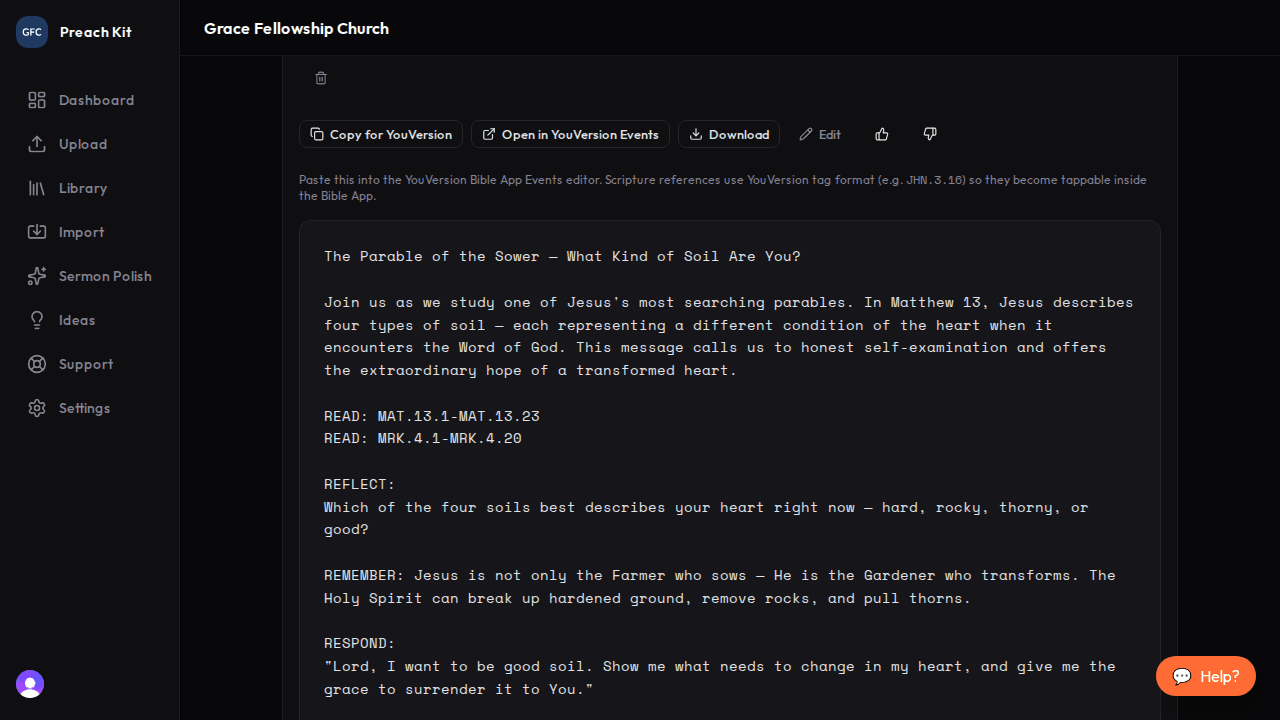
Scripture tags are formatted for YouVersion — tap them in the app to open the passage Copy and paste into YouVersion Events
Click Copy. Open the YouVersion for Organizations dashboard, navigate to your church's Events, create a new event or edit an existing one, and paste the notes into the content field. Save and publish according to your church's YouVersion workflow.
YouVersion Events work best when created before or on the day of the service, so your congregation can follow along live. If you process your sermon on Saturday evening, generate the event notes then and publish them Sunday morning before service begins.
Tips for Best Results
- Add the date preached, speaker name, and scripture references to the sermon details before generating. PreachKit uses these to populate the event header fields precisely, which saves manual editing in the YouVersion dashboard.
- If your sermon includes fill-in-the-blank phrases and you upload your notes file, PreachKit preserves the blanks in the main points section — exactly as your congregation expects to see them.
- The output is intentionally plain text with no markdown formatting. Do not add headings or bullet syntax before pasting into YouVersion — the platform handles its own display formatting.
Plan Availability
YouVersion Events is available on all paid plans.
Common Questions
Can I regenerate? Yes — click Regenerate. Each regeneration uses one generation credit. Because the output closely follows the factual content of the sermon (scriptures, dates, speaker), regenerations will be similar but may vary in phrasing.
Does PreachKit publish directly to YouVersion? No. PreachKit generates the text. You publish to YouVersion through the YouVersion for Organizations dashboard at organizations.youversion.com.
What if a scripture tag is wrong?
Click the tag text and edit it. YouVersion tags use the format BOOK.CHAPTER.VERSE — for example, EPH.2.8-9 for Ephesians 2:8-9. A full list of YouVersion book codes is available in the YouVersion developer documentation.
What's Next?
Pair your YouVersion event with a printed Sermon Outline for people who prefer a physical handout, or return to the overview to explore all 16 content types.